[UIKit] 셀을 모르는 UICollectionView 어댑터 만들기
UICollectionView 화면을 만들 때마다 셀 등록, 재사용, 데이터 바인딩, 크기 계산이 반복됩니다. 이 코드를 어댑터로 옮기면 뷰 컨트롤러는 단순해집니다. 대신 어댑터가 구체적인 셀을 고르고 데이터를 넣어야 합니다.
토스도 비슷한 문제를 겪었습니다. SLASH 22 발표 영상을 보면 토스 앱의 많은 화면은 UICollectionView로 만들어져 있습니다. CollectionViewAdapter는 화면마다 반복하던 데이터 소스와 레이아웃 코드를 줄였지만, 디자인 시스템의 뷰는 여전히 UICollectionViewCell을 상속하고 구체적인 CellItemModel을 알아야 했습니다. UIKit 밖에서 같은 뷰를 쓰려면 이 결합부터 끊어야 했습니다.
같은 목록을 세 번 구현하면서 토스가 Component를 만든 이유를 따라가 보겠습니다.
- 뷰 컨트롤러가 커스텀 셀을 직접 관리합니다.
- 반복되는 컬렉션 뷰 코드를 어댑터로 옮깁니다.
- Component와 ContainerCell로 뷰를 셀과 모델에서 분리합니다.
발표는 UIKit으로 만든 토스 디자인 시스템을 SwiftUI에서도 사용하는 과정을 다룹니다. 이 글은 그 출발점인 UICollectionView 의존성 분리부터 Component를 SwiftUI로 연결하는 흐름까지 따라갑니다. 공개된 영상과 슬라이드에서 확인한 구조만 작은 예제로 옮겼습니다.
세 가지 구현을 비교한 뒤에는 ComponentModifier, Result Builder, SwiftUI 연결이 이 구조 위에서 어떤 문제를 더 해결하는지도 살펴봅니다. 마지막에는 서로 다른 Component를 같은 배열에 담기 위한 타입 소거를 클로저 방식과 Box 방식으로 나눠 비교합니다.
1단계. 뷰 컨트롤러에서 셀을 직접 만듭니다
가장 익숙한 방식부터 시작합니다. 뷰 컨트롤러가 AccountCell을 등록하고, UICollectionViewDataSource 메서드에서 셀을 꺼내 데이터를 넣습니다.
collectionView.register(
    AccountCell.self,
    forCellWithReuseIdentifier: AccountCell.reuseIdentifier
)

func collectionView(
    _ collectionView: UICollectionView,
    cellForItemAt indexPath: IndexPath
) -> UICollectionViewCell {
    let cell = collectionView.dequeueReusableCell(
        withReuseIdentifier: AccountCell.reuseIdentifier,
        for: indexPath
    ) as! AccountCell

    cell.configure(with: items[indexPath.item])
    return cell
}
화면이 작을 때는 이 구조가 가장 읽기 쉽습니다. Apple 문서가 설명하는 셀 요청과 재사용 흐름이 한 파일에 그대로 드러납니다.
셀 종류가 늘어나면 뷰 컨트롤러가 다음 책임을 함께 떠안습니다.
- 어떤 셀을 등록할지 결정합니다.
- 어떤 셀을 꺼낼지 결정합니다.
- 모델을 셀에 어떻게 넣을지 결정합니다.
- 셀 크기를 계산합니다.
NoticeCell이나 BannerCell을 추가할 때마다 등록 코드와 cellForItemAt 분기가 함께 늘어납니다. 셀 크기가 다르면 레이아웃 분기도 추가해야 합니다. 화면 코드에 UICollectionView를 다루기 위한 반복 작업이 쌓입니다.
1단계 전체 코드 보기
import UIKit

struct AccountItem {
    let name: String
    let amount: String
}

final class AccountCell: UICollectionViewCell {
    static let reuseIdentifier = String(describing: AccountCell.self)

    private let nameLabel: UILabel = {
        let label = UILabel()
        label.font = .preferredFont(forTextStyle: .body)
        label.textColor = .label
        return label
    }()

    private let amountLabel: UILabel = {
        let label = UILabel()
        label.font = .preferredFont(forTextStyle: .headline)
        label.textColor = .label
        label.textAlignment = .right
        return label
    }()

    override init(frame: CGRect) {
        super.init(frame: frame)

        contentView.backgroundColor = .secondarySystemBackground
        contentView.layer.cornerRadius = 12

        let stack = UIStackView(arrangedSubviews: [nameLabel, amountLabel])
        stack.axis = .horizontal
        stack.alignment = .center
        stack.spacing = 12
        stack.translatesAutoresizingMaskIntoConstraints = false

        contentView.addSubview(stack)
        NSLayoutConstraint.activate([
            stack.leadingAnchor.constraint(equalTo: contentView.leadingAnchor, constant: 16),
            stack.trailingAnchor.constraint(equalTo: contentView.trailingAnchor, constant: -16),
            stack.topAnchor.constraint(equalTo: contentView.topAnchor),
            stack.bottomAnchor.constraint(equalTo: contentView.bottomAnchor)
        ])
    }

    @available(*, unavailable)
    required init?(coder: NSCoder) {
        fatalError("init(coder:) has not been implemented")
    }

    override func prepareForReuse() {
        super.prepareForReuse()
        nameLabel.text = nil
        amountLabel.text = nil
    }

    func configure(with item: AccountItem) {
        nameLabel.text = item.name
        amountLabel.text = item.amount
    }
}

final class BasicCollectionViewController: UIViewController {
    private let items = [
        AccountItem(name: "토스뱅크 통장", amount: "116,848원"),
        AccountItem(name: "저축 통장", amount: "20,000원"),
        AccountItem(name: "비상금", amount: "50,000원")
    ]

    private lazy var collectionView: UICollectionView = {
        let layout = UICollectionViewFlowLayout()
        layout.minimumLineSpacing = 8
        layout.sectionInset = UIEdgeInsets(top: 16, left: 16, bottom: 16, right: 16)

        let collectionView = UICollectionView(frame: .zero, collectionViewLayout: layout)
        collectionView.backgroundColor = .systemBackground
        collectionView.translatesAutoresizingMaskIntoConstraints = false
        collectionView.dataSource = self
        collectionView.delegate = self
        collectionView.register(
            AccountCell.self,
            forCellWithReuseIdentifier: AccountCell.reuseIdentifier
        )
        return collectionView
    }()

    override func viewDidLoad() {
        super.viewDidLoad()

        title = "내 계좌"
        view.backgroundColor = .systemBackground
        view.addSubview(collectionView)

        NSLayoutConstraint.activate([
            collectionView.topAnchor.constraint(equalTo: view.safeAreaLayoutGuide.topAnchor),
            collectionView.leadingAnchor.constraint(equalTo: view.leadingAnchor),
            collectionView.trailingAnchor.constraint(equalTo: view.trailingAnchor),
            collectionView.bottomAnchor.constraint(equalTo: view.bottomAnchor)
        ])
    }
}

extension BasicCollectionViewController: UICollectionViewDataSource {
    func collectionView(
        _ collectionView: UICollectionView,
        numberOfItemsInSection section: Int
    ) -> Int {
        items.count
    }

    func collectionView(
        _ collectionView: UICollectionView,
        cellForItemAt indexPath: IndexPath
    ) -> UICollectionViewCell {
        guard let cell = collectionView.dequeueReusableCell(
            withReuseIdentifier: AccountCell.reuseIdentifier,
            for: indexPath
        ) as? AccountCell else {
            preconditionFailure("AccountCell을 꺼낼 수 없습니다.")
        }

        cell.configure(with: items[indexPath.item])
        return cell
    }
}

extension BasicCollectionViewController: UICollectionViewDelegateFlowLayout {
    func collectionView(
        _ collectionView: UICollectionView,
        layout collectionViewLayout: UICollectionViewLayout,
        sizeForItemAt indexPath: IndexPath
    ) -> CGSize {
        CGSize(width: max(collectionView.bounds.width - 32, 0), height: 64)
    }
}
2단계. 반복 작업을 어댑터로 옮깁니다
데이터 소스와 레이아웃 델리게이트를 FeedCollectionViewAdapter로 옮겨보겠습니다. 뷰 컨트롤러에는 컬렉션 뷰를 만들고 어댑터를 보관하는 코드만 남습니다.
final class FeedCollectionViewAdapter: NSObject,
    UICollectionViewDataSource,
    UICollectionViewDelegateFlowLayout {

    func collectionView(
        _ collectionView: UICollectionView,
        cellForItemAt indexPath: IndexPath
    ) -> UICollectionViewCell {
        switch items[indexPath.item] {
        case let .account(item):
            let cell = collectionView.dequeueReusableCell(
                withReuseIdentifier: AccountCell.reuseIdentifier,
                for: indexPath
            ) as! AccountCell
            cell.configure(with: item)
            return cell

        case let .notice(message):
            let cell = collectionView.dequeueReusableCell(
                withReuseIdentifier: NoticeCell.reuseIdentifier,
                for: indexPath
            ) as! NoticeCell
            cell.configure(message: message)
            return cell
        }
    }
}
뷰 컨트롤러에서는 셀 분기가 사라졌습니다. 어댑터가 AccountCell과 NoticeCell을 등록하고, 타입에 맞게 캐스팅하고, 각 셀의 configure 호출법까지 맡습니다. 반복 코드를 한곳에 모은 대신 구체적인 셀 의존성도 어댑터로 이동했습니다.
이 예제에 새로운 셀을 추가하려면 다음 코드를 함께 바꿔야 합니다.
- FeedItem에 case를 추가합니다.
- 어댑터에 셀 등록 코드를 추가합니다.
- cellForItemAt에 분기를 추가합니다.
- 크기가 다르면 sizeForItemAt에도 분기를 추가합니다.
어댑터를 여러 화면에서 공통으로 쓰면 화면별 셀 분기가 계속 쌓입니다. 뷰 컨트롤러는 짧아졌지만 셀 의존성은 그대로 남아 있습니다.
토스는 반복되는 컬렉션 뷰 작업을 어댑터에 모았습니다
토스는 UICollectionView를 사용하는 화면마다 같은 코드를 반복하지 않으려고 CollectionViewAdapter를 만들었습니다. 발표 영상의 설명에서는 어댑터가 맡은 일을 다음과 같이 소개합니다.
- 섹션을 연결하면 어댑터가 UICollectionViewDataSource와 UICollectionViewDelegateFlowLayout을 대신합니다.
- 각 CellItemModel의 크기 전략으로 셀 크기를 계산합니다.
- 아이템 모델의 해시가 바뀌면 추가, 삭제, 갱신을 처리합니다.
- Touchable, ContainsButton, ContainsSwitch 같은 기능별 이벤트를 모아 Rx 인터페이스로 내보냅니다.
화면에서는 섹션만 어댑터에 연결합니다. 셀 크기와 데이터 변경, 이벤트 처리는 CollectionViewAdapter가 맡습니다.
이 글의 FeedCollectionViewAdapter는 셀을 고르는 책임이 어디에 남는지 확인하려고 switch로 단순화했습니다. 토스의 실제 구현과는 다릅니다.
뷰는 여전히 UICollectionView에 묶여 있습니다
어댑터가 화면의 반복 작업을 없애도 디자인 시스템 뷰의 제약은 남았습니다. 발표에서 설명한 기존 구조에서는 ListRow가 UICollectionViewCell을 상속한 BaseView의 하위 타입이었습니다. ListRow는 추상 타입으로 받은 CellItemModel을 구체적인 ListRowItemModel로 캐스팅한 뒤 화면을 그렸습니다.
이 구조에는 두 가지 결합이 있습니다. 화면을 그리는 뷰가 UICollectionViewCell이어야 하고, 그 뷰가 자신에게 들어올 모델 타입까지 알아야 합니다. UICollectionView 안에서는 동작하지만 평범한 UIView가 필요한 곳이나 SwiftUI로 옮기기는 어렵습니다.
토스는 이미 사용하던 CollectionViewAdapter를 그대로 두었습니다. 대신 Component가 디자인 시스템 뷰의 생성과 렌더링을 맡으면서 UICollectionViewCell과 CellItemModel 의존성을 끊었습니다.
2단계 전체 코드 보기
import UIKit

struct AccountItem {
    let name: String
    let amount: String
}

enum FeedItem {
    case account(AccountItem)
    case notice(String)
}

final class AccountCell: UICollectionViewCell {
    static let reuseIdentifier = String(describing: AccountCell.self)

    private let nameLabel: UILabel = {
        let label = UILabel()
        label.font = .preferredFont(forTextStyle: .body)
        label.textColor = .label
        return label
    }()

    private let amountLabel: UILabel = {
        let label = UILabel()
        label.font = .preferredFont(forTextStyle: .headline)
        label.textColor = .label
        label.textAlignment = .right
        return label
    }()

    override init(frame: CGRect) {
        super.init(frame: frame)

        contentView.backgroundColor = .secondarySystemBackground
        contentView.layer.cornerRadius = 12

        let stack = UIStackView(arrangedSubviews: [nameLabel, amountLabel])
        stack.axis = .horizontal
        stack.alignment = .center
        stack.spacing = 12
        stack.translatesAutoresizingMaskIntoConstraints = false

        contentView.addSubview(stack)
        NSLayoutConstraint.activate([
            stack.leadingAnchor.constraint(equalTo: contentView.leadingAnchor, constant: 16),
            stack.trailingAnchor.constraint(equalTo: contentView.trailingAnchor, constant: -16),
            stack.topAnchor.constraint(equalTo: contentView.topAnchor),
            stack.bottomAnchor.constraint(equalTo: contentView.bottomAnchor)
        ])
    }

    @available(*, unavailable)
    required init?(coder: NSCoder) {
        fatalError("init(coder:) has not been implemented")
    }

    override func prepareForReuse() {
        super.prepareForReuse()
        nameLabel.text = nil
        amountLabel.text = nil
    }

    func configure(with item: AccountItem) {
        nameLabel.text = item.name
        amountLabel.text = item.amount
    }
}

final class NoticeCell: UICollectionViewCell {
    static let reuseIdentifier = String(describing: NoticeCell.self)

    private let messageLabel: UILabel = {
        let label = UILabel()
        label.font = .preferredFont(forTextStyle: .subheadline)
        label.textColor = .secondaryLabel
        label.numberOfLines = 0
        return label
    }()

    override init(frame: CGRect) {
        super.init(frame: frame)

        contentView.backgroundColor = .tertiarySystemBackground
        contentView.layer.cornerRadius = 12
        messageLabel.translatesAutoresizingMaskIntoConstraints = false

        contentView.addSubview(messageLabel)
        NSLayoutConstraint.activate([
            messageLabel.leadingAnchor.constraint(equalTo: contentView.leadingAnchor, constant: 16),
            messageLabel.trailingAnchor.constraint(equalTo: contentView.trailingAnchor, constant: -16),
            messageLabel.topAnchor.constraint(equalTo: contentView.topAnchor, constant: 12),
            messageLabel.bottomAnchor.constraint(equalTo: contentView.bottomAnchor, constant: -12)
        ])
    }

    @available(*, unavailable)
    required init?(coder: NSCoder) {
        fatalError("init(coder:) has not been implemented")
    }

    override func prepareForReuse() {
        super.prepareForReuse()
        messageLabel.text = nil
    }

    func configure(message: String) {
        messageLabel.text = message
    }
}

final class FeedCollectionViewAdapter: NSObject {
    private weak var collectionView: UICollectionView?
    private var items: [FeedItem]

    init(collectionView: UICollectionView, items: [FeedItem]) {
        self.collectionView = collectionView
        self.items = items
        super.init()

        collectionView.register(
            AccountCell.self,
            forCellWithReuseIdentifier: AccountCell.reuseIdentifier
        )
        collectionView.register(
            NoticeCell.self,
            forCellWithReuseIdentifier: NoticeCell.reuseIdentifier
        )
        collectionView.dataSource = self
        collectionView.delegate = self
    }

    func update(items: [FeedItem]) {
        self.items = items
        collectionView?.reloadData()
    }
}

extension FeedCollectionViewAdapter: UICollectionViewDataSource {
    func collectionView(
        _ collectionView: UICollectionView,
        numberOfItemsInSection section: Int
    ) -> Int {
        items.count
    }

    func collectionView(
        _ collectionView: UICollectionView,
        cellForItemAt indexPath: IndexPath
    ) -> UICollectionViewCell {
        switch items[indexPath.item] {
        case let .account(item):
            guard let cell = collectionView.dequeueReusableCell(
                withReuseIdentifier: AccountCell.reuseIdentifier,
                for: indexPath
            ) as? AccountCell else {
                preconditionFailure("AccountCell을 꺼낼 수 없습니다.")
            }
            cell.configure(with: item)
            return cell

        case let .notice(message):
            guard let cell = collectionView.dequeueReusableCell(
                withReuseIdentifier: NoticeCell.reuseIdentifier,
                for: indexPath
            ) as? NoticeCell else {
                preconditionFailure("NoticeCell을 꺼낼 수 없습니다.")
            }
            cell.configure(message: message)
            return cell
        }
    }
}

extension FeedCollectionViewAdapter: UICollectionViewDelegateFlowLayout {
    func collectionView(
        _ collectionView: UICollectionView,
        layout collectionViewLayout: UICollectionViewLayout,
        sizeForItemAt indexPath: IndexPath
    ) -> CGSize {
        let width = max(collectionView.bounds.width - 32, 0)

        switch items[indexPath.item] {
        case .account:
            return CGSize(width: width, height: 64)
        case .notice:
            return CGSize(width: width, height: 72)
        }
    }
}

final class AdapterCollectionViewController: UIViewController {
    private let items: [FeedItem] = [
        .notice("계좌를 누르면 거래 내역을 확인할 수 있어요."),
        .account(AccountItem(name: "토스뱅크 통장", amount: "116,848원")),
        .account(AccountItem(name: "저축 통장", amount: "20,000원")),
        .account(AccountItem(name: "비상금", amount: "50,000원"))
    ]

    private lazy var collectionView: UICollectionView = {
        let layout = UICollectionViewFlowLayout()
        layout.minimumLineSpacing = 8
        layout.sectionInset = UIEdgeInsets(top: 16, left: 16, bottom: 16, right: 16)

        let collectionView = UICollectionView(frame: .zero, collectionViewLayout: layout)
        collectionView.backgroundColor = .systemBackground
        collectionView.translatesAutoresizingMaskIntoConstraints = false
        return collectionView
    }()

    private var adapter: FeedCollectionViewAdapter!

    override func viewDidLoad() {
        super.viewDidLoad()

        title = "내 계좌"
        view.backgroundColor = .systemBackground
        view.addSubview(collectionView)

        NSLayoutConstraint.activate([
            collectionView.topAnchor.constraint(equalTo: view.safeAreaLayoutGuide.topAnchor),
            collectionView.leadingAnchor.constraint(equalTo: view.leadingAnchor),
            collectionView.trailingAnchor.constraint(equalTo: view.trailingAnchor),
            collectionView.bottomAnchor.constraint(equalTo: view.bottomAnchor)
        ])

        adapter = FeedCollectionViewAdapter(
            collectionView: collectionView,
            items: items
        )
    }
}
3단계. 뷰를 셀과 모델에서 분리합니다
발표 자료의 Component는 기존 CollectionViewAdapter가 요구하는 CellItemModelType과 FlowSizeable을 따릅니다. 화면과 어댑터는 이전과 같은 방식으로 데이터를 주고받습니다.
Component는 Content 타입의 UIView를 만들고 데이터를 그립니다. ContainerCell은 이 UIView를 UICollectionView 안에 담습니다. 디자인 시스템 뷰는 UICollectionViewCell을 직접 상속하지 않습니다.
공개된 구조에서 핵심만 남겨 예제에 옮기면 다음과 같습니다.
protocol CollectionComponent {
    associatedtype Content: UIView

    func createContent() -> Content
    func render(context: ComponentContext, content: Content)
    func size(in collectionView: UICollectionView) -> CGSize
}

final class ContainerCell<C: CollectionComponent>: UICollectionViewCell {
    private var hostedContent: C.Content?

    func render(component: C, context: ComponentContext) {
        let content = hostedContent ?? install(component.createContent())
        component.render(context: context, content: content)
    }
}
createContent와 render를 나눈 이유
발표에서 설명한 생명주기에서는 cellForItemAt이 처음 호출될 때 createContent()로 뷰를 만듭니다. ContainerCell은 생성한 뷰를 보관합니다. 셀이 다시 사용될 때는 새 뷰를 만들지 않고 render()만 호출해 현재 데이터를 반영합니다.
createContent()는 뷰의 생명주기를, render()는 데이터 적용을 담당합니다. ContainerCell이 셀을 재사용하고 Component가 화면에 그릴 내용을 정합니다.
AccountRowView는 평범한 UIView로 남습니다. AccountItem을 해석하는 일은 AccountRowComponent가 맡고, 뷰에는 실제로 표시할 문자열만 전달합니다. 뷰 안에서 CellItemModel을 캐스팅하던 코드가 사라집니다.
struct AccountRowComponent: CollectionComponent {
    let item: AccountItem

    func createContent() -> AccountRowView {
        AccountRowView()
    }

    func render(context: ComponentContext, content: AccountRowView) {
        content.render(name: item.name, amount: item.amount)
    }

    // size(in:) 구현은 생략합니다.
}
서로 다른 Component를 같은 배열에 담습니다
여기까지는 제네릭 타입이 서로 달라 하나의 배열에 담을 수 없다는 문제가 남습니다. 예를 들어 AccountRowComponent와 NoticeComponent의 Content 타입은 다릅니다. 공개 슬라이드는 배열에 담는 구현 세부를 생략하고 있어, 이 예제에서는 AnyCollectionComponent로 타입을 소거합니다. 이때 셀 등록, 셀 생성, 크기 계산 방법을 클로저에 담습니다.
struct AnyCollectionComponent {
    private let registerCell: (UICollectionView) -> Void
    private let dequeueCell: (UICollectionView, IndexPath) -> UICollectionViewCell
    private let resolveSize: (UICollectionView) -> CGSize

    init<C: CollectionComponent>(_ component: C) {
        let reuseIdentifier = String(reflecting: ContainerCell<C>.self)

        registerCell = { collectionView in
            collectionView.register(
                ContainerCell<C>.self,
                forCellWithReuseIdentifier: reuseIdentifier
            )
        }

        dequeueCell = { collectionView, indexPath in
            let cell = collectionView.dequeueReusableCell(
                withReuseIdentifier: reuseIdentifier,
                for: indexPath
            ) as! ContainerCell<C>

            cell.render(
                component: component,
                context: ComponentContext(indexPath: indexPath)
            )
            return cell
        }

        resolveSize = component.size
    }
}
AnyCollectionComponent가 ContainerCell의 타입과 등록 방법을 보관하므로 어댑터는 AccountCell이나 NoticeCell을 참조하지 않습니다. cellForItemAt에는 구체적인 셀을 고르는 switch도 남지 않습니다.
func collectionView(
    _ collectionView: UICollectionView,
    cellForItemAt indexPath: IndexPath
) -> UICollectionViewCell {
    components[indexPath.item].dequeue(
        from: collectionView,
        at: indexPath
    )
}
새 UI를 추가할 때는 CollectionComponent를 구현하고 AnyCollectionComponent로 감쌉니다. 공통 어댑터는 수정하지 않습니다. 세 예제를 비교하면 셀을 다루는 책임이 어디로 옮겨갔는지 확인됩니다.
| 방식 | 구체적인 셀을 고르는 곳 | 데이터를 그리는 곳 | 화면 뷰의 기반 타입 |
|---|---|---|---|
| 기본 구현 | 뷰 컨트롤러 | UICollectionViewCell | UICollectionViewCell |
| 어댑터 분리 | 어댑터 | UICollectionViewCell | UICollectionViewCell |
| Component + ContainerCell | Component | Component | UIView |
이벤트 처리도 Component에 붙입니다
기존 구조에서는 CollectionViewAdapter가 Touchable, ContainsButton, ContainsSwitch를 따르는 셀의 이벤트를 모아 Rx 인터페이스로 내보냈습니다. ComponentModifier를 설명하는 부분에서는 이벤트 연결도 렌더링 과정으로 옮깁니다. Content가 Touchable을 따를 때만 onTouch를 제공하므로, 해당 기능이 있는 뷰에만 Modifier를 붙일 수 있습니다.
Component가 뷰 생성, 데이터 적용, 이벤트 연결을 맡으면 같은 Component를 Result Builder와 SwiftUI에서도 사용할 수 있습니다. 3단계에서는 UICollectionView의 셀 의존성을 끊는 데 집중하고, 다음 단계에서 이 구조를 더 확장해 보겠습니다.
UIKit 구조를 남긴 이유
발표 후반의 설명에서는 처음부터 SwiftUI로 디자인 시스템을 만들지 않은 이유도 다룹니다. 당시 토스 앱의 최소 지원 버전은 iOS 13이었고, SwiftUI는 버전에 따라 다르게 동작하는 부분이 있었습니다. 자주 쓰는 당겨서 새로고침 API인 refreshable(action:)도 iOS 15부터 사용할 수 있어 이전 버전에서는 직접 구현해야 했습니다.
토스는 UIKit 디자인 시스템과 CollectionViewAdapter를 계속 사용했습니다. Component가 뷰 생성과 렌더링을 맡으면서 같은 UIKit 뷰를 SwiftUI에서도 사용할 수 있게 됐습니다.
3단계 전체 코드 보기
import UIKit

struct AccountItem {
    let name: String
    let amount: String
}

struct ComponentContext {
    let indexPath: IndexPath
}

protocol CollectionComponent {
    associatedtype Content: UIView

    func createContent() -> Content
    func render(context: ComponentContext, content: Content)
    func size(in collectionView: UICollectionView) -> CGSize
}

final class ContainerCell<C: CollectionComponent>: UICollectionViewCell {
    private var hostedContent: C.Content?

    override init(frame: CGRect) {
        super.init(frame: frame)
    }

    @available(*, unavailable)
    required init?(coder: NSCoder) {
        fatalError("init(coder:) has not been implemented")
    }

    func render(component: C, context: ComponentContext) {
        let content: C.Content

        if let hostedContent {
            content = hostedContent
        } else {
            let newContent = component.createContent()
            newContent.translatesAutoresizingMaskIntoConstraints = false
            contentView.addSubview(newContent)

            NSLayoutConstraint.activate([
                newContent.topAnchor.constraint(equalTo: contentView.topAnchor),
                newContent.leadingAnchor.constraint(equalTo: contentView.leadingAnchor),
                newContent.trailingAnchor.constraint(equalTo: contentView.trailingAnchor),
                newContent.bottomAnchor.constraint(equalTo: contentView.bottomAnchor)
            ])

            hostedContent = newContent
            content = newContent
        }

        component.render(context: context, content: content)
    }
}

struct AnyCollectionComponent {
    private let registerCell: (UICollectionView) -> Void
    private let dequeueCell: (UICollectionView, IndexPath) -> UICollectionViewCell
    private let resolveSize: (UICollectionView) -> CGSize

    init<C: CollectionComponent>(_ component: C) {
        let reuseIdentifier = String(reflecting: ContainerCell<C>.self)

        registerCell = { collectionView in
            collectionView.register(
                ContainerCell<C>.self,
                forCellWithReuseIdentifier: reuseIdentifier
            )
        }

        dequeueCell = { collectionView, indexPath in
            guard let cell = collectionView.dequeueReusableCell(
                withReuseIdentifier: reuseIdentifier,
                for: indexPath
            ) as? ContainerCell<C> else {
                preconditionFailure("ContainerCell을 꺼낼 수 없습니다.")
            }

            cell.render(
                component: component,
                context: ComponentContext(indexPath: indexPath)
            )
            return cell
        }

        resolveSize = { collectionView in
            component.size(in: collectionView)
        }
    }

    func register(in collectionView: UICollectionView) {
        registerCell(collectionView)
    }

    func dequeue(
        from collectionView: UICollectionView,
        at indexPath: IndexPath
    ) -> UICollectionViewCell {
        dequeueCell(collectionView, indexPath)
    }

    func size(in collectionView: UICollectionView) -> CGSize {
        resolveSize(collectionView)
    }
}

final class AccountRowView: UIView {
    private let nameLabel: UILabel = {
        let label = UILabel()
        label.font = .preferredFont(forTextStyle: .body)
        label.textColor = .label
        return label
    }()

    private let amountLabel: UILabel = {
        let label = UILabel()
        label.font = .preferredFont(forTextStyle: .headline)
        label.textColor = .label
        label.textAlignment = .right
        return label
    }()

    override init(frame: CGRect) {
        super.init(frame: frame)

        backgroundColor = .secondarySystemBackground
        layer.cornerRadius = 12

        let stack = UIStackView(arrangedSubviews: [nameLabel, amountLabel])
        stack.axis = .horizontal
        stack.alignment = .center
        stack.spacing = 12
        stack.translatesAutoresizingMaskIntoConstraints = false

        addSubview(stack)
        NSLayoutConstraint.activate([
            stack.leadingAnchor.constraint(equalTo: leadingAnchor, constant: 16),
            stack.trailingAnchor.constraint(equalTo: trailingAnchor, constant: -16),
            stack.topAnchor.constraint(equalTo: topAnchor),
            stack.bottomAnchor.constraint(equalTo: bottomAnchor)
        ])
    }

    @available(*, unavailable)
    required init?(coder: NSCoder) {
        fatalError("init(coder:) has not been implemented")
    }

    func render(name: String, amount: String) {
        nameLabel.text = name
        amountLabel.text = amount
    }
}

final class NoticeView: UIView {
    private let messageLabel: UILabel = {
        let label = UILabel()
        label.font = .preferredFont(forTextStyle: .subheadline)
        label.textColor = .secondaryLabel
        label.numberOfLines = 0
        return label
    }()

    override init(frame: CGRect) {
        super.init(frame: frame)

        backgroundColor = .tertiarySystemBackground
        layer.cornerRadius = 12
        messageLabel.translatesAutoresizingMaskIntoConstraints = false

        addSubview(messageLabel)
        NSLayoutConstraint.activate([
            messageLabel.leadingAnchor.constraint(equalTo: leadingAnchor, constant: 16),
            messageLabel.trailingAnchor.constraint(equalTo: trailingAnchor, constant: -16),
            messageLabel.topAnchor.constraint(equalTo: topAnchor, constant: 12),
            messageLabel.bottomAnchor.constraint(equalTo: bottomAnchor, constant: -12)
        ])
    }

    @available(*, unavailable)
    required init?(coder: NSCoder) {
        fatalError("init(coder:) has not been implemented")
    }

    func render(message: String) {
        messageLabel.text = message
    }
}

struct AccountRowComponent: CollectionComponent {
    let item: AccountItem

    func createContent() -> AccountRowView {
        AccountRowView()
    }

    func render(context: ComponentContext, content: AccountRowView) {
        content.render(name: item.name, amount: item.amount)
    }

    func size(in collectionView: UICollectionView) -> CGSize {
        CGSize(width: max(collectionView.bounds.width - 32, 0), height: 64)
    }
}

struct NoticeComponent: CollectionComponent {
    let message: String

    func createContent() -> NoticeView {
        NoticeView()
    }

    func render(context: ComponentContext, content: NoticeView) {
        content.render(message: message)
    }

    func size(in collectionView: UICollectionView) -> CGSize {
        CGSize(width: max(collectionView.bounds.width - 32, 0), height: 72)
    }
}

final class ComponentCollectionViewAdapter: NSObject {
    private weak var collectionView: UICollectionView?
    private var components: [AnyCollectionComponent]

    init(
        collectionView: UICollectionView,
        components: [AnyCollectionComponent]
    ) {
        self.collectionView = collectionView
        self.components = components
        super.init()

        components.forEach { $0.register(in: collectionView) }
        collectionView.dataSource = self
        collectionView.delegate = self
    }

    func update(components: [AnyCollectionComponent]) {
        self.components = components

        if let collectionView {
            components.forEach { $0.register(in: collectionView) }
            collectionView.reloadData()
        }
    }
}

extension ComponentCollectionViewAdapter: UICollectionViewDataSource {
    func collectionView(
        _ collectionView: UICollectionView,
        numberOfItemsInSection section: Int
    ) -> Int {
        components.count
    }

    func collectionView(
        _ collectionView: UICollectionView,
        cellForItemAt indexPath: IndexPath
    ) -> UICollectionViewCell {
        components[indexPath.item].dequeue(
            from: collectionView,
            at: indexPath
        )
    }
}

extension ComponentCollectionViewAdapter: UICollectionViewDelegateFlowLayout {
    func collectionView(
        _ collectionView: UICollectionView,
        layout collectionViewLayout: UICollectionViewLayout,
        sizeForItemAt indexPath: IndexPath
    ) -> CGSize {
        components[indexPath.item].size(in: collectionView)
    }
}

final class ComponentCollectionViewController: UIViewController {
    private lazy var collectionView: UICollectionView = {
        let layout = UICollectionViewFlowLayout()
        layout.minimumLineSpacing = 8
        layout.sectionInset = UIEdgeInsets(top: 16, left: 16, bottom: 16, right: 16)

        let collectionView = UICollectionView(frame: .zero, collectionViewLayout: layout)
        collectionView.backgroundColor = .systemBackground
        collectionView.translatesAutoresizingMaskIntoConstraints = false
        return collectionView
    }()

    private var adapter: ComponentCollectionViewAdapter!

    override func viewDidLoad() {
        super.viewDidLoad()

        title = "내 계좌"
        view.backgroundColor = .systemBackground
        view.addSubview(collectionView)

        NSLayoutConstraint.activate([
            collectionView.topAnchor.constraint(equalTo: view.safeAreaLayoutGuide.topAnchor),
            collectionView.leadingAnchor.constraint(equalTo: view.leadingAnchor),
            collectionView.trailingAnchor.constraint(equalTo: view.trailingAnchor),
            collectionView.bottomAnchor.constraint(equalTo: view.bottomAnchor)
        ])

        let components: [AnyCollectionComponent] = [
            AnyCollectionComponent(
                NoticeComponent(message: "계좌를 누르면 거래 내역을 확인할 수 있어요.")
            ),
            AnyCollectionComponent(
                AccountRowComponent(
                    item: AccountItem(name: "토스뱅크 통장", amount: "116,848원")
                )
            ),
            AnyCollectionComponent(
                AccountRowComponent(
                    item: AccountItem(name: "저축 통장", amount: "20,000원")
                )
            ),
            AnyCollectionComponent(
                AccountRowComponent(
                    item: AccountItem(name: "비상금", amount: "50,000원")
                )
            )
        ]

        adapter = ComponentCollectionViewAdapter(
            collectionView: collectionView,
            components: components
        )
    }
}
4단계. Component를 선언형 문법으로 확장합니다
3단계에서는 뷰를 UICollectionViewCell과 CellItemModel에서 분리했습니다. 토스는 Component에 이벤트를 붙이고 목록을 선언하는 문법을 더했습니다. 같은 Component를 SwiftUI에서 사용하는 작업도 이 구조 위에서 이어졌습니다.
Modifier로 이벤트를 조합합니다
기존 구조에서는 CollectionViewAdapter가 화면에 보이는 셀을 검사해 터치, 버튼, 스위치 이벤트를 모았습니다. 이벤트 종류가 늘수록 어댑터가 알아야 할 프로토콜과 Rx 인터페이스도 함께 늘어납니다.
발표의 ComponentModifier는 이 책임을 Component 쪽으로 옮깁니다. Modifier도 Component를 따르기 때문에 ContainerCell과 어댑터는 이전과 같은 방식으로 처리합니다. 렌더링할 때 원래 Component가 먼저 뷰를 그리고 Modifier가 필요한 이벤트를 연결합니다.
발표의 제네릭 조건을 현재 예제에 맞게 줄이면 다음과 같습니다.
extension CollectionComponent where Content: Touchable {
    func onTouch(
        _ action: @escaping () -> Void
    ) -> OnTouchModifier<Self> {
        OnTouchModifier(wrapped: self, action: action)
    }
}
onTouch는 Content가 Touchable을 따를 때만 노출됩니다. 터치 기능이 없는 뷰에서 호출하면 컴파일되지 않습니다. 발표 속 OnTouchModifier는 render가 호출될 때 터치 이벤트를 구독하고, 구독의 생명주기는 렌더링 Context에 묶습니다.
호출하는 쪽에서는 이벤트 처리 코드를 Component 뒤에 이어 붙입니다.
AccountRowComponent(item: account)
    .onTouch {
        openAccount(account)
    }
어댑터가 처리하던 기능별 분기는 Modifier로 나뉘고, 각 Component에는 필요한 이벤트만 붙습니다.
Result Builder로 목록을 선언합니다
Component를 배열에 하나씩 넣어도 동작하지만 섹션과 반복문, Modifier가 섞이면 목록의 계층을 파악하기 어렵습니다. 발표의 Result Builder는 섹션 안에 어떤 Component가 들어가는지 코드 구조로 표현합니다.
private var sections: [LazySection] {
    [
        LazySection(identifier: "accounts") {
            For(of: accounts) { account in
                AccountRowComponent(item: account)
                    .onTouch { openAccount(account) }
            }
        }
    ]
}
AccountListViewController의 프로퍼티에는 Result Builder를 붙이지 않습니다. LazySection과 For의 클로저 파라미터가 SectionModelsBuilder로 선언되어 있어 호출하는 쪽에서는 Component를 차례로 적기만 하면 됩니다.
발표 코드에서는 이 섹션 배열을 Observable.just로 감싸 CollectionViewAdapter에 바인딩합니다. Rx는 완성된 섹션을 전달합니다. Result Builder가 중괄호 안의 Component를 섹션 모델로 바꾸는 과정과는 별개입니다.
이 문법은 SwiftUI의 ViewBuilder와 비슷하게 생겼습니다. UIKit은 CollectionViewAdapter로, SwiftUI는 ViewBuilder로 화면을 그립니다. 렌더링 과정은 다르지만 Component를 배치하는 코드는 비슷하게 읽힙니다.
UIViewRepresentable로 SwiftUI에 연결합니다
발표의 SwiftUI 연결은 UIViewRepresentable을 사용합니다. makeUIView는 Component의 Content를 담을 UIKit 호스트 뷰를 만들고, updateUIView는 Component의 render를 호출합니다. SwiftUI가 상태를 갱신할 때마다 기존 Component가 새 데이터를 그립니다.
생성과 갱신에 필요한 코드만 남기면 다음과 같습니다.
struct ComponentRepresenting<C: Component>: UIViewRepresentable {
    let component: C

    func makeUIView(context: Context) -> UIComponentView<C> {
        UIComponentView<C>()
    }

    func updateUIView(_ uiView: UIComponentView<C>, context: Context) {
        uiView.render(component)
    }
}
실제 발표 구조에는 ComponentViewProxy와 ComponentView가 한 단계 더 있습니다. ComponentView는 SwiftUI의 onAppear와 onDisappear를 UIKit 쪽 contentWillDisplay와 contentDidEndDisplay로 전달합니다. 기존 Component가 사용하던 노출 생명주기를 SwiftUI에서도 그대로 호출합니다.
Component와 ComponentModifier가 SwiftUI의 View도 따르면 UIKit에서 사용하던 선언을 SwiftUI 안에도 같은 형태로 배치합니다.
ScrollView {
    VStack(spacing: 0) {
        ForEach(accounts) { account in
            AccountRowComponent(item: account)
                .onTouch { openAccount(account) }
        }
    }
}
두 환경이 공유하는 부분과 각자 맡는 부분을 나누면 다음과 같습니다.
| 구분 | UIKit | SwiftUI |
|---|---|---|
| 목록 선언 | SectionModelsBuilder | ViewBuilder |
| Component를 담는 객체 | ContainerCell | UIViewRepresentable의 호스트 뷰 |
| 화면 갱신 | CollectionViewAdapter가 render 호출 | updateUIView가 render 호출 |
| 노출 생명주기 | 셀 표시 콜백 | onAppear와 onDisappear를 전달 |
| 공통으로 쓰는 것 | Component와 ComponentModifier | Component와 ComponentModifier |
아래 코드는 같은 AccountRowComponent를 UIKit과 SwiftUI에서 사용하는 흐름을 확인할 수 있도록 발표에서 공개된 구조를 작은 예제로 다시 구성한 것입니다. UIKit 예제에는 Modifier와 Result Builder를, SwiftUI 예제에는 UIViewRepresentable 브리지를 담았습니다.
4단계 UIKit 전체 코드 보기
import UIKit

struct AccountItem {
    let name: String
    let amount: String
}

struct ComponentContext {
    let indexPath: IndexPath
}

protocol CollectionComponent {
    associatedtype Content: UIView

    func createContent() -> Content
    func render(context: ComponentContext, content: Content)
    func size(in collectionView: UICollectionView) -> CGSize
}

protocol Touchable: AnyObject {
    var onTouch: (() -> Void)? { get set }
}

final class ContainerCell<C: CollectionComponent>: UICollectionViewCell {
    private var hostedContent: C.Content?

    override init(frame: CGRect) {
        super.init(frame: frame)
    }

    @available(*, unavailable)
    required init?(coder: NSCoder) {
        fatalError("init(coder:) has not been implemented")
    }

    func render(component: C, context: ComponentContext) {
        let content: C.Content

        if let hostedContent {
            content = hostedContent
        } else {
            let newContent = component.createContent()
            newContent.translatesAutoresizingMaskIntoConstraints = false
            contentView.addSubview(newContent)

            NSLayoutConstraint.activate([
                newContent.topAnchor.constraint(equalTo: contentView.topAnchor),
                newContent.leadingAnchor.constraint(equalTo: contentView.leadingAnchor),
                newContent.trailingAnchor.constraint(equalTo: contentView.trailingAnchor),
                newContent.bottomAnchor.constraint(equalTo: contentView.bottomAnchor)
            ])

            hostedContent = newContent
            content = newContent
        }

        component.render(context: context, content: content)
    }
}

struct AnyCollectionComponent {
    private let registerCell: (UICollectionView) -> Void
    private let dequeueCell: (UICollectionView, IndexPath) -> UICollectionViewCell
    private let resolveSize: (UICollectionView) -> CGSize

    init<C: CollectionComponent>(_ component: C) {
        let reuseIdentifier = String(reflecting: ContainerCell<C>.self)

        registerCell = { collectionView in
            collectionView.register(
                ContainerCell<C>.self,
                forCellWithReuseIdentifier: reuseIdentifier
            )
        }

        dequeueCell = { collectionView, indexPath in
            guard let cell = collectionView.dequeueReusableCell(
                withReuseIdentifier: reuseIdentifier,
                for: indexPath
            ) as? ContainerCell<C> else {
                preconditionFailure("ContainerCell을 꺼낼 수 없습니다.")
            }

            cell.render(
                component: component,
                context: ComponentContext(indexPath: indexPath)
            )
            return cell
        }

        resolveSize = { collectionView in
            component.size(in: collectionView)
        }
    }

    func register(in collectionView: UICollectionView) {
        registerCell(collectionView)
    }

    func dequeue(
        from collectionView: UICollectionView,
        at indexPath: IndexPath
    ) -> UICollectionViewCell {
        dequeueCell(collectionView, indexPath)
    }

    func size(in collectionView: UICollectionView) -> CGSize {
        resolveSize(collectionView)
    }
}

struct OnTouchModifier<Wrapped: CollectionComponent>: CollectionComponent
where Wrapped.Content: Touchable {
    let wrapped: Wrapped
    let action: () -> Void

    func createContent() -> Wrapped.Content {
        wrapped.createContent()
    }

    func render(context: ComponentContext, content: Wrapped.Content) {
        wrapped.render(context: context, content: content)
        content.onTouch = action
    }

    func size(in collectionView: UICollectionView) -> CGSize {
        wrapped.size(in: collectionView)
    }
}

extension CollectionComponent where Content: Touchable {
    func onTouch(_ action: @escaping () -> Void) -> OnTouchModifier<Self> {
        OnTouchModifier(wrapped: self, action: action)
    }
}

struct ComponentGroup {
    fileprivate let components: [AnyCollectionComponent]
}

protocol ComponentListConvertible {
    var components: [AnyCollectionComponent] { get }
}

struct For<Data: RandomAccessCollection>: ComponentListConvertible {
    let components: [AnyCollectionComponent]

    init(
        of data: Data,
        @SectionModelsBuilder content: (Data.Element) -> ComponentGroup
    ) {
        components = data.flatMap { content($0).components }
    }
}

@resultBuilder
enum SectionModelsBuilder {
    static func buildExpression<C: CollectionComponent>(
        _ component: C
    ) -> ComponentGroup {
        ComponentGroup(components: [AnyCollectionComponent(component)])
    }

    static func buildExpression<C: ComponentListConvertible>(
        _ convertible: C
    ) -> ComponentGroup {
        ComponentGroup(components: convertible.components)
    }

    static func buildBlock(_ groups: ComponentGroup...) -> ComponentGroup {
        ComponentGroup(components: groups.flatMap(\.components))
    }

    static func buildOptional(_ group: ComponentGroup?) -> ComponentGroup {
        group ?? ComponentGroup(components: [])
    }

    static func buildEither(first group: ComponentGroup) -> ComponentGroup {
        group
    }

    static func buildEither(second group: ComponentGroup) -> ComponentGroup {
        group
    }

    static func buildArray(_ groups: [ComponentGroup]) -> ComponentGroup {
        ComponentGroup(components: groups.flatMap(\.components))
    }
}

struct LazySection {
    let identifier: String
    let components: [AnyCollectionComponent]

    init(
        identifier: String,
        @SectionModelsBuilder content: () -> ComponentGroup
    ) {
        self.identifier = identifier
        self.components = content().components
    }
}

final class AccountRowView: UIControl, Touchable {
    var onTouch: (() -> Void)?

    private let nameLabel: UILabel = {
        let label = UILabel()
        label.font = .preferredFont(forTextStyle: .body)
        return label
    }()

    private let amountLabel: UILabel = {
        let label = UILabel()
        label.font = .preferredFont(forTextStyle: .headline)
        label.textAlignment = .right
        return label
    }()

    override init(frame: CGRect) {
        super.init(frame: frame)

        backgroundColor = .secondarySystemBackground
        layer.cornerRadius = 12
        addTarget(self, action: #selector(didTouch), for: .touchUpInside)

        let stack = UIStackView(arrangedSubviews: [nameLabel, amountLabel])
        stack.axis = .horizontal
        stack.alignment = .center
        stack.spacing = 12
        stack.isUserInteractionEnabled = false
        stack.translatesAutoresizingMaskIntoConstraints = false

        addSubview(stack)
        NSLayoutConstraint.activate([
            stack.leadingAnchor.constraint(equalTo: leadingAnchor, constant: 16),
            stack.trailingAnchor.constraint(equalTo: trailingAnchor, constant: -16),
            stack.topAnchor.constraint(equalTo: topAnchor),
            stack.bottomAnchor.constraint(equalTo: bottomAnchor)
        ])
    }

    @available(*, unavailable)
    required init?(coder: NSCoder) {
        fatalError("init(coder:) has not been implemented")
    }

    func render(name: String, amount: String) {
        nameLabel.text = name
        amountLabel.text = amount
    }

    @objc private func didTouch() {
        onTouch?()
    }
}

final class NoticeView: UIView {
    private let messageLabel: UILabel = {
        let label = UILabel()
        label.font = .preferredFont(forTextStyle: .subheadline)
        label.textColor = .secondaryLabel
        label.numberOfLines = 0
        return label
    }()

    override init(frame: CGRect) {
        super.init(frame: frame)

        backgroundColor = .tertiarySystemBackground
        layer.cornerRadius = 12
        messageLabel.translatesAutoresizingMaskIntoConstraints = false

        addSubview(messageLabel)
        NSLayoutConstraint.activate([
            messageLabel.leadingAnchor.constraint(equalTo: leadingAnchor, constant: 16),
            messageLabel.trailingAnchor.constraint(equalTo: trailingAnchor, constant: -16),
            messageLabel.topAnchor.constraint(equalTo: topAnchor, constant: 12),
            messageLabel.bottomAnchor.constraint(equalTo: bottomAnchor, constant: -12)
        ])
    }

    @available(*, unavailable)
    required init?(coder: NSCoder) {
        fatalError("init(coder:) has not been implemented")
    }

    func render(message: String) {
        messageLabel.text = message
    }
}

struct AccountRowComponent: CollectionComponent {
    let item: AccountItem

    func createContent() -> AccountRowView {
        AccountRowView()
    }

    func render(context: ComponentContext, content: AccountRowView) {
        content.render(name: item.name, amount: item.amount)
    }

    func size(in collectionView: UICollectionView) -> CGSize {
        CGSize(width: max(collectionView.bounds.width - 32, 0), height: 64)
    }
}

struct NoticeComponent: CollectionComponent {
    let message: String

    func createContent() -> NoticeView {
        NoticeView()
    }

    func render(context: ComponentContext, content: NoticeView) {
        content.render(message: message)
    }

    func size(in collectionView: UICollectionView) -> CGSize {
        CGSize(width: max(collectionView.bounds.width - 32, 0), height: 72)
    }
}

final class ComponentCollectionViewAdapter: NSObject {
    private weak var collectionView: UICollectionView?
    private var sections: [LazySection]

    init(collectionView: UICollectionView, sections: [LazySection]) {
        self.collectionView = collectionView
        self.sections = sections
        super.init()

        registerComponents()
        collectionView.dataSource = self
        collectionView.delegate = self
    }

    func update(sections: [LazySection]) {
        self.sections = sections
        registerComponents()
        collectionView?.reloadData()
    }

    private func registerComponents() {
        guard let collectionView else { return }

        sections
            .flatMap(\.components)
            .forEach { $0.register(in: collectionView) }
    }
}

extension ComponentCollectionViewAdapter: UICollectionViewDataSource {
    func numberOfSections(in collectionView: UICollectionView) -> Int {
        sections.count
    }

    func collectionView(
        _ collectionView: UICollectionView,
        numberOfItemsInSection section: Int
    ) -> Int {
        sections[section].components.count
    }

    func collectionView(
        _ collectionView: UICollectionView,
        cellForItemAt indexPath: IndexPath
    ) -> UICollectionViewCell {
        sections[indexPath.section].components[indexPath.item].dequeue(
            from: collectionView,
            at: indexPath
        )
    }
}

extension ComponentCollectionViewAdapter: UICollectionViewDelegateFlowLayout {
    func collectionView(
        _ collectionView: UICollectionView,
        layout collectionViewLayout: UICollectionViewLayout,
        sizeForItemAt indexPath: IndexPath
    ) -> CGSize {
        sections[indexPath.section].components[indexPath.item].size(
            in: collectionView
        )
    }
}

final class AccountListViewController: UIViewController {
    private let accounts = [
        AccountItem(name: "토스뱅크 통장", amount: "116,848원"),
        AccountItem(name: "저축 통장", amount: "20,000원"),
        AccountItem(name: "비상금", amount: "50,000원")
    ]

    private lazy var collectionView: UICollectionView = {
        let layout = UICollectionViewFlowLayout()
        layout.minimumLineSpacing = 8
        layout.sectionInset = UIEdgeInsets(
            top: 16,
            left: 16,
            bottom: 16,
            right: 16
        )

        let collectionView = UICollectionView(
            frame: .zero,
            collectionViewLayout: layout
        )
        collectionView.backgroundColor = .systemBackground
        collectionView.translatesAutoresizingMaskIntoConstraints = false
        return collectionView
    }()

    private var adapter: ComponentCollectionViewAdapter!

    private var sections: [LazySection] {
        [
            LazySection(identifier: "accounts") {
                NoticeComponent(
                    message: "계좌를 누르면 거래 내역을 확인할 수 있어요."
                )

                For(of: accounts) { account in
                    AccountRowComponent(item: account)
                        .onTouch { [weak self] in
                            self?.openAccount(account)
                        }
                }
            }
        ]
    }

    override func viewDidLoad() {
        super.viewDidLoad()

        title = "내 계좌"
        view.backgroundColor = .systemBackground
        view.addSubview(collectionView)

        NSLayoutConstraint.activate([
            collectionView.topAnchor.constraint(
                equalTo: view.safeAreaLayoutGuide.topAnchor
            ),
            collectionView.leadingAnchor.constraint(equalTo: view.leadingAnchor),
            collectionView.trailingAnchor.constraint(equalTo: view.trailingAnchor),
            collectionView.bottomAnchor.constraint(equalTo: view.bottomAnchor)
        ])

        adapter = ComponentCollectionViewAdapter(
            collectionView: collectionView,
            sections: sections
        )
    }

    private func openAccount(_ account: AccountItem) {
        print("선택한 계좌: \(account.name)")
    }
}
4단계 SwiftUI 전체 코드 보기
import SwiftUI
import UIKit

struct AccountItem: Identifiable {
    let id = UUID()
    let name: String
    let amount: String
}

struct ComponentContext {}

protocol CollectionComponent: View {
    associatedtype Content: UIView

    func createContent() -> Content
    func render(context: ComponentContext, content: Content)
}

protocol Touchable: AnyObject {
    var onTouch: (() -> Void)? { get set }
}

extension CollectionComponent {
    var body: some View {
        ComponentRepresenting(component: self)
    }
}

struct OnTouchModifier<Wrapped: CollectionComponent>: CollectionComponent
where Wrapped.Content: Touchable {
    let wrapped: Wrapped
    let action: () -> Void

    func createContent() -> Wrapped.Content {
        wrapped.createContent()
    }

    func render(context: ComponentContext, content: Wrapped.Content) {
        wrapped.render(context: context, content: content)
        content.onTouch = action
    }
}

extension CollectionComponent where Content: Touchable {
    func onTouch(_ action: @escaping () -> Void) -> OnTouchModifier<Self> {
        OnTouchModifier(wrapped: self, action: action)
    }
}

final class UIComponentView<C: CollectionComponent>: UIView {
    private var hostedContent: C.Content?

    func render(_ component: C) {
        let content: C.Content

        if let hostedContent {
            content = hostedContent
        } else {
            let newContent = component.createContent()
            newContent.translatesAutoresizingMaskIntoConstraints = false
            addSubview(newContent)

            NSLayoutConstraint.activate([
                newContent.topAnchor.constraint(equalTo: topAnchor),
                newContent.leadingAnchor.constraint(equalTo: leadingAnchor),
                newContent.trailingAnchor.constraint(equalTo: trailingAnchor),
                newContent.bottomAnchor.constraint(equalTo: bottomAnchor)
            ])

            hostedContent = newContent
            content = newContent
        }

        component.render(context: ComponentContext(), content: content)
    }
}

struct ComponentRepresenting<C: CollectionComponent>: UIViewRepresentable {
    let component: C

    func makeUIView(context: Context) -> UIComponentView<C> {
        UIComponentView<C>()
    }

    func updateUIView(_ uiView: UIComponentView<C>, context: Context) {
        uiView.render(component)
    }
}

final class AccountRowView: UIControl, Touchable {
    var onTouch: (() -> Void)?

    private let nameLabel: UILabel = {
        let label = UILabel()
        label.font = .preferredFont(forTextStyle: .body)
        return label
    }()

    private let amountLabel: UILabel = {
        let label = UILabel()
        label.font = .preferredFont(forTextStyle: .headline)
        label.textAlignment = .right
        return label
    }()

    override init(frame: CGRect) {
        super.init(frame: frame)

        backgroundColor = .secondarySystemBackground
        layer.cornerRadius = 12
        addTarget(self, action: #selector(didTouch), for: .touchUpInside)

        let stack = UIStackView(arrangedSubviews: [nameLabel, amountLabel])
        stack.axis = .horizontal
        stack.alignment = .center
        stack.spacing = 12
        stack.isUserInteractionEnabled = false
        stack.translatesAutoresizingMaskIntoConstraints = false

        addSubview(stack)
        NSLayoutConstraint.activate([
            stack.leadingAnchor.constraint(equalTo: leadingAnchor, constant: 16),
            stack.trailingAnchor.constraint(equalTo: trailingAnchor, constant: -16),
            stack.topAnchor.constraint(equalTo: topAnchor),
            stack.bottomAnchor.constraint(equalTo: bottomAnchor)
        ])
    }

    @available(*, unavailable)
    required init?(coder: NSCoder) {
        fatalError("init(coder:) has not been implemented")
    }

    func render(name: String, amount: String) {
        nameLabel.text = name
        amountLabel.text = amount
    }

    @objc private func didTouch() {
        onTouch?()
    }
}

struct AccountRowComponent: CollectionComponent {
    let item: AccountItem

    func createContent() -> AccountRowView {
        AccountRowView()
    }

    func render(context: ComponentContext, content: AccountRowView) {
        content.render(name: item.name, amount: item.amount)
    }
}

struct AccountListView: View {
    let accounts: [AccountItem]
    let openAccount: (AccountItem) -> Void

    var body: some View {
        ScrollView {
            LazyVStack(spacing: 8) {
                ForEach(accounts) { account in
                    AccountRowComponent(item: account)
                        .onTouch {
                            openAccount(account)
                        }
                        .frame(height: 64)
                }
            }
            .padding(16)
        }
    }
}

struct AccountListView_Previews: PreviewProvider {
    static var previews: some View {
        AccountListView(
            accounts: [
                AccountItem(name: "토스뱅크 통장", amount: "116,848원"),
                AccountItem(name: "저축 통장", amount: "20,000원"),
                AccountItem(name: "비상금", amount: "50,000원")
            ],
            openAccount: { account in
                print("선택한 계좌: \(account.name)")
            }
        )
    }
}
Design Syntax Tree로 이어집니다
발표 마지막에는 Design Syntax Tree와 Server Driven UI가 등장합니다. Component, Modifier, Builder로 UI를 트리처럼 표현하고, 여러 플랫폼이 같은 디자인 문법을 해석하는 구상입니다.
발표에서는 구체적인 구현까지 다루지 않습니다. 토스는 이 구조를 Design Syntax Tree와 Server Driven UI까지 확장할 계획이었다고 설명합니다.
필요한 만큼만 분리합니다
셀 종류가 적고 한 화면에서만 쓰는 컬렉션 뷰라면 뷰 컨트롤러가 셀을 직접 관리하는 편이 읽기 쉽습니다. 작은 화면에 어댑터와 타입 소거를 먼저 넣으면 이해해야 할 타입만 늘어납니다.
여러 화면에서 데이터 소스, 크기 계산, 업데이트, 이벤트 처리를 반복한다면 어댑터가 그 비용을 줄여줍니다. 토스의 CollectionViewAdapter도 이 문제를 해결하려고 만들어졌습니다.
디자인 시스템의 뷰를 컬렉션 뷰 밖에서도 사용해야 한다면 어댑터 분리만으로는 부족합니다. 뷰가 UICollectionViewCell을 상속하거나 구체적인 CellItemModel을 캐스팅하는 순간 재사용 범위가 다시 UIKit 컬렉션 뷰로 좁아집니다. Component와 ContainerCell은 이 경계를 분리합니다.
Component를 도입해도 기존 CollectionViewAdapter는 그대로 사용할 수 있고, 디자인 시스템 뷰는 평범한 UIView로 남습니다. 그만큼 제네릭과 타입 소거, 셀 생명주기를 함께 이해해야 합니다. 같은 UI를 여러 렌더링 환경에서 사용해야 할 때 이 비용을 감수할 이유가 생깁니다.
이벤트 분기가 어댑터에 계속 쌓이면 Modifier로 나눕니다. UIKit과 SwiftUI에서 같은 Component 구성을 사용한다면 Result Builder와 SwiftUI 브리지를 더합니다. 단순한 UICollectionView 화면에서는 3단계의 Component와 ContainerCell까지만 사용해도 됩니다.
셀 의존성은 Component 경계 안으로 이동합니다
1단계에서는 뷰 컨트롤러가 구체적인 셀을 알았습니다. 2단계에서는 그 책임을 어댑터가 맡았습니다. 3단계에서는 AnyCollectionComponent와 ContainerCell이 셀 등록과 생성을 담당합니다. ViewController와 Adapter에는 공통 인터페이스만 남습니다.
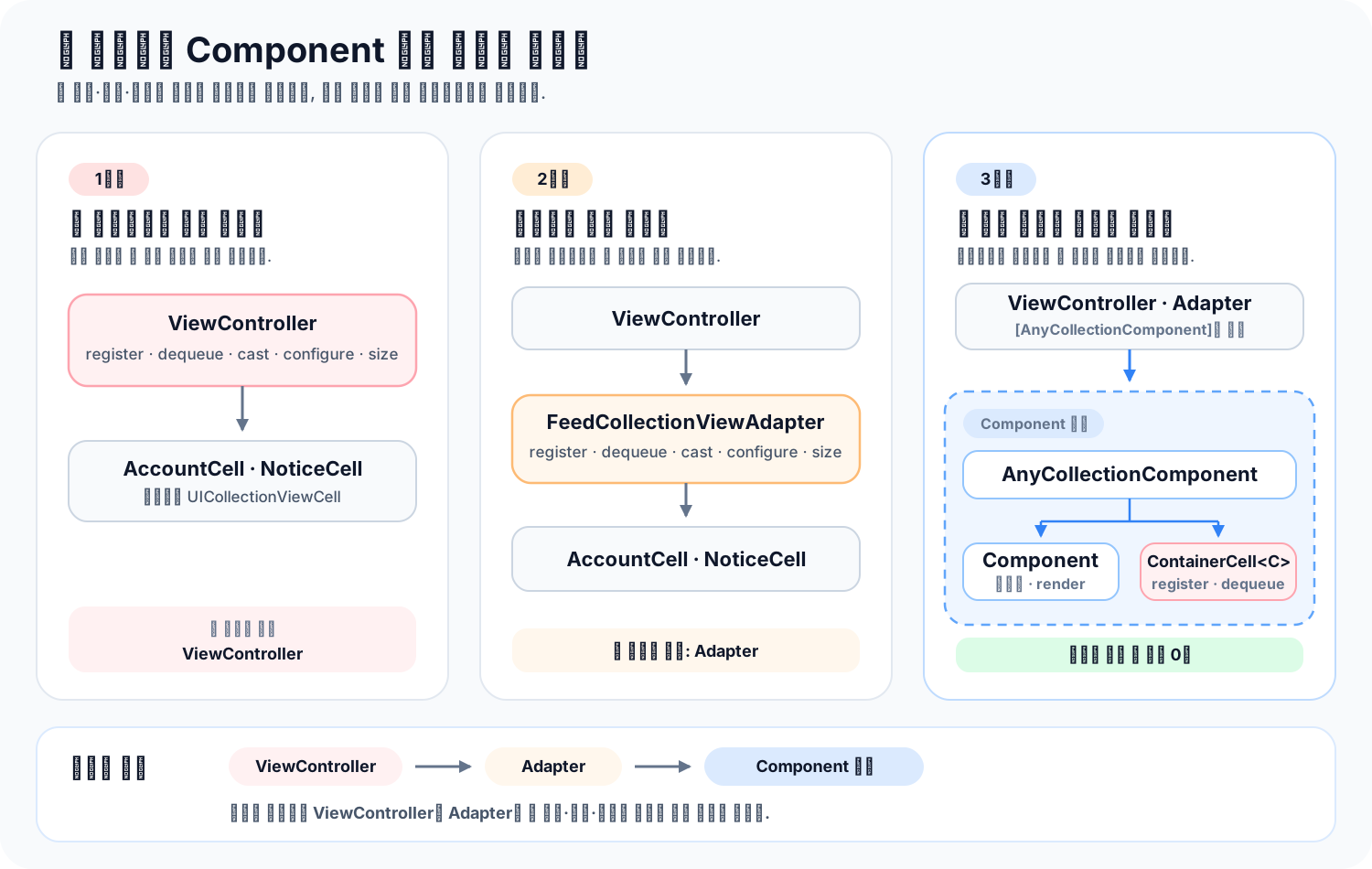
타입 소거는 클로저와 Box로 구현할 수 있습니다
앞선 예제의 AccountRowComponent와 NoticeComponent는 모두 CollectionComponent를 따릅니다. 하지만 두 타입의 Content는 각각 AccountRowView와 NoticeView입니다. ContainerCell의 구체적인 타입도 ContainerCell<AccountRowComponent>와 ContainerCell<NoticeComponent>로 달라집니다.
protocol CollectionComponent {
    associatedtype Content: UIView

    func createContent() -> Content
    func render(context: ComponentContext, content: Content)
    func size(in collectionView: UICollectionView) -> CGSize
}
Swift 5.7부터는 any를 사용해 서로 다른 Component를 [any CollectionComponent]에 담을 수 있습니다. 하지만 어댑터가 필요한 작업까지 해결되지는 않습니다. 어댑터는 감춰진 구체 타입 C를 사용해 다음 작업을 해야 합니다.
- ContainerCell<C>를 등록합니다.
- 재사용 셀을 ContainerCell<C>로 캐스팅합니다.
- C.Content를 만들고 같은 타입을 render에 전달합니다.
- C가 구현한 크기 계산을 호출합니다.
특히 셀 등록과 셀 생성은 서로 다른 UICollectionView 콜백에서 실행됩니다. 한 번 열린 existential의 구체 타입을 두 콜백 사이에 그대로 유지할 수 없습니다. 따라서 어댑터가 실제로 사용할 register, dequeue, size를 연관 타입이 없는 인터페이스로 다시 감싸야 합니다.
타입 소거는 구체 타입을 없애지 않습니다. 구체 타입은 래퍼 안에 남아 있습니다. 래퍼 바깥에서 그 타입의 이름을 보지 않고 필요한 동작만 호출하게 만드는 기법에 가깝습니다.
토스는 이 경계를 클로저 기반 타입 소거로 해결했습니다. 다만 공개 발표 자료에는 서로 다른 Component를 배열에 담는 실제 타입 소거 코드까지 나오지 않습니다. 아래 구현은 같은 아이디어를 현재 예제에 맞게 단순화한 AnyCollectionComponent입니다.
비교가 쉽도록 같은 구현을 ClosureAnyCollectionComponent라는 이름으로 다시 적어보겠습니다.
struct ClosureAnyCollectionComponent {
    private let registerCell: (UICollectionView) -> Void
    private let dequeueCell: (
        UICollectionView,
        IndexPath
    ) -> UICollectionViewCell
    private let resolveSize: (UICollectionView) -> CGSize

    init<C: CollectionComponent>(_ component: C) {
        let reuseIdentifier = String(reflecting: ContainerCell<C>.self)

        registerCell = { collectionView in
            collectionView.register(
                ContainerCell<C>.self,
                forCellWithReuseIdentifier: reuseIdentifier
            )
        }

        dequeueCell = { collectionView, indexPath in
            guard let cell = collectionView.dequeueReusableCell(
                withReuseIdentifier: reuseIdentifier,
                for: indexPath
            ) as? ContainerCell<C> else {
                preconditionFailure("ContainerCell을 꺼낼 수 없습니다.")
            }

            cell.render(
                component: component,
                context: ComponentContext(indexPath: indexPath)
            )
            return cell
        }

        resolveSize = { collectionView in
            component.size(in: collectionView)
        }
    }

    func register(in collectionView: UICollectionView) {
        registerCell(collectionView)
    }

    func dequeue(
        from collectionView: UICollectionView,
        at indexPath: IndexPath
    ) -> UICollectionViewCell {
        dequeueCell(collectionView, indexPath)
    }

    func size(in collectionView: UICollectionView) -> CGSize {
        resolveSize(collectionView)
    }
}
타입 소거는 제네릭 이니셜라이저에서 일어납니다. ClosureAnyCollectionComponent(AccountRowComponent(…))를 만들면 C는 AccountRowComponent로 정해집니다. 이때 세 클로저는 component, ContainerCell<C>, reuseIdentifier를 캡처합니다.
래퍼를 만든 뒤에는 바깥에서 C가 보이지 않습니다. 배열은 ClosureAnyCollectionComponent라는 한 타입만 저장합니다.
let components: [ClosureAnyCollectionComponent] = [
    ClosureAnyCollectionComponent(
        NoticeComponent(message: "계좌를 선택해 주세요.")
    ),
    ClosureAnyCollectionComponent(
        AccountRowComponent(item: account)
    )
]
어댑터가 dequeue(from:at:)를 호출하면 저장된 dequeueCell 클로저가 실행됩니다. 클로저 내부에는 여전히 C가 보이므로 ContainerCell<C>로 안전하게 내려갈 수 있습니다. 어댑터만 구체 타입을 모릅니다.
클로저 방식은 필요한 동작이 적을 때 간결합니다. 추상 기반 클래스나 오버라이드가 필요 없고, 각 동작을 제네릭 이니셜라이저 안에서 바로 정의할 수 있습니다. 반면 소거할 동작이 늘어날 때는 저장 프로퍼티, 이니셜라이저, 전달 메서드를 함께 추가해야 합니다. 캡처한 값의 생명주기나 상태를 추적할 때도 전용 객체보다 흐름이 덜 선명할 수 있습니다.
Box 방식은 동작을 클로저로 나누지 않습니다. 연관 타입이 없는 추상 Box가 공통 인터페이스를 정의하고, 제네릭 Box가 구체적인 Component를 보관한 채 동작을 구현합니다. 외부에 노출되는 래퍼는 추상 Box만 참조합니다.
private class AnyCollectionComponentBox {
    func register(in collectionView: UICollectionView) {
        preconditionFailure("하위 Box에서 register를 구현해야 합니다.")
    }

    func dequeue(
        from collectionView: UICollectionView,
        at indexPath: IndexPath
    ) -> UICollectionViewCell {
        preconditionFailure("하위 Box에서 dequeue를 구현해야 합니다.")
    }

    func size(in collectionView: UICollectionView) -> CGSize {
        preconditionFailure("하위 Box에서 size를 구현해야 합니다.")
    }
}

private final class CollectionComponentBox<C: CollectionComponent>:
    AnyCollectionComponentBox {

    private let component: C

    private var reuseIdentifier: String {
        String(reflecting: ContainerCell<C>.self)
    }

    init(_ component: C) {
        self.component = component
        super.init()
    }

    override func register(in collectionView: UICollectionView) {
        collectionView.register(
            ContainerCell<C>.self,
            forCellWithReuseIdentifier: reuseIdentifier
        )
    }

    override func dequeue(
        from collectionView: UICollectionView,
        at indexPath: IndexPath
    ) -> UICollectionViewCell {
        guard let cell = collectionView.dequeueReusableCell(
            withReuseIdentifier: reuseIdentifier,
            for: indexPath
        ) as? ContainerCell<C> else {
            preconditionFailure("ContainerCell을 꺼낼 수 없습니다.")
        }

        cell.render(
            component: component,
            context: ComponentContext(indexPath: indexPath)
        )
        return cell
    }

    override func size(in collectionView: UICollectionView) -> CGSize {
        component.size(in: collectionView)
    }
}

struct BoxAnyCollectionComponent {
    private let box: AnyCollectionComponentBox

    init<C: CollectionComponent>(_ component: C) {
        box = CollectionComponentBox(component)
    }

    func register(in collectionView: UICollectionView) {
        box.register(in: collectionView)
    }

    func dequeue(
        from collectionView: UICollectionView,
        at indexPath: IndexPath
    ) -> UICollectionViewCell {
        box.dequeue(from: collectionView, at: indexPath)
    }

    func size(in collectionView: UICollectionView) -> CGSize {
        box.size(in: collectionView)
    }
}
여기서는 세 층이 역할을 나눕니다.
- AnyCollectionComponentBox는 어댑터에 필요한 연관 타입 없는 인터페이스를 정의합니다.
- CollectionComponentBox<C>는 구체적인 C를 보관합니다. ContainerCell<C>를 등록하고 꺼낼 수 있는 곳도 이 타입입니다.
- BoxAnyCollectionComponent는 Box 구현을 감추고 어댑터가 사용할 API만 노출합니다.
BoxAnyCollectionComponent의 제네릭 이니셜라이저가 CollectionComponentBox<C>를 만든 뒤 이를 AnyCollectionComponentBox로 올려서 저장하는 순간 구체 타입이 외부에서 사라집니다. 실제 메서드를 호출할 때는 동적 디스패치가 CollectionComponentBox<C>의 오버라이드로 연결합니다.
사용하는 쪽은 클로저 방식과 거의 같습니다.
let components: [BoxAnyCollectionComponent] = [
    BoxAnyCollectionComponent(
        NoticeComponent(message: "계좌를 선택해 주세요.")
    ),
    BoxAnyCollectionComponent(
        AccountRowComponent(item: account)
    )
]
Box 방식은 관련 동작과 상태를 하나의 객체에 모을 수 있습니다. 셀 노출 생명주기, prefetch, 재사용 준비처럼 소거할 동작이 많아질수록 구조를 따라가기 쉽습니다. Box 자체를 테스트 대역으로 바꾸거나 메서드에 중단점을 잡기도 편합니다.
대신 추상 Box, 제네릭 Box, 외부 래퍼가 필요해 코드가 길어집니다. 추상 Box의 메서드를 빠뜨리면 런타임 오류가 발생하므로 모든 메서드를 제네릭 Box에서 오버라이드해야 합니다. 래퍼는 구조체지만 내부에 클래스 Box를 보관하기 때문에 래퍼를 복사해도 같은 Box 인스턴스를 공유한다는 점도 알아야 합니다.
두 방식 모두 어댑터에서 구체 타입을 감추고, 호출 한 번을 간접적으로 전달합니다. 클로저 방식은 제네릭 타입이 알고 있는 동작을 함수 값으로 저장합니다. Box 방식은 제네릭 하위 클래스에 구체 타입과 동작을 함께 저장합니다.
| 비교 기준 | 클로저 방식 | Box 방식 |
|---|---|---|
| 구체 타입을 아는 곳 | 제네릭 이니셜라이저 안의 클로저 | CollectionComponentBox<C> |
| 호출 방식 | 저장한 클로저 호출 | 추상 Box를 통한 동적 디스패치 |
| 코드 양 | 동작이 적으면 짧음 | 기본 클래스와 하위 클래스가 필요해 길어짐 |
| 동작 추가 | 클로저 프로퍼티, 이니셜라이저, 전달 메서드 수정 | 기본 Box, 제네릭 Box, 전달 메서드 수정 |
| 상태와 생명주기 | 여러 클로저의 캡처로 나뉨 | Box 한 객체에 모임 |
| 복사 시 주의점 | 클로저의 캡처 컨텍스트를 공유할 수 있음 | 같은 Box 인스턴스를 공유함 |
| 잘 맞는 경우 | 소거할 동작이 적고 단순함 | 동작과 내부 상태가 계속 늘어남 |
현재 예제처럼 register, dequeue, size만 필요하다면 클로저 방식이 충분합니다. Component가 식별자, 셀 노출 이벤트, prefetch, 재사용 상태까지 맡게 된다면 Box 방식도 좋은 선택입니다. 관련 상태와 동작을 한 타입에서 관리할 수 있기 때문입니다.
성능만으로 방식을 고르기는 어렵습니다. 클로저는 캡처 컨텍스트를 만들 수 있고, Box는 클래스 인스턴스를 만듭니다. 최적화 결과도 코드 모양과 컴파일 설정에 따라 달라집니다. 실제 목록에서 두 구현을 프로파일링하기 전에는 한쪽이 항상 더 빠르다고 단정하지 않는 편이 안전합니다.
어떤 방식을 사용해도 어댑터가 보는 인터페이스는 register, dequeue, size로 유지됩니다. 타입 소거 구현을 바꾸더라도 ViewController와 Adapter가 다시 구체적인 셀 타입을 알게 만들지 않는 것이 핵심입니다.
아래 두 코드는 같은 계좌 목록을 만듭니다. AnyCollectionComponent의 내부 구현만 다르므로 둘 중 하나를 선택해서 사용하면 됩니다.
Box 방식 전체 코드 보기
import UIKit

struct AccountItem {
    let name: String
    let amount: String
}

struct ComponentContext {
    let indexPath: IndexPath
}

protocol CollectionComponent {
    associatedtype Content: UIView

    func createContent() -> Content
    func render(context: ComponentContext, content: Content)
    func size(in collectionView: UICollectionView) -> CGSize
}

final class ContainerCell<C: CollectionComponent>: UICollectionViewCell {
    private var hostedContent: C.Content?

    override init(frame: CGRect) {
        super.init(frame: frame)
    }

    @available(*, unavailable)
    required init?(coder: NSCoder) {
        fatalError("init(coder:) has not been implemented")
    }

    func render(component: C, context: ComponentContext) {
        let content: C.Content

        if let hostedContent {
            content = hostedContent
        } else {
            let newContent = component.createContent()
            newContent.translatesAutoresizingMaskIntoConstraints = false
            contentView.addSubview(newContent)

            NSLayoutConstraint.activate([
                newContent.topAnchor.constraint(equalTo: contentView.topAnchor),
                newContent.leadingAnchor.constraint(equalTo: contentView.leadingAnchor),
                newContent.trailingAnchor.constraint(equalTo: contentView.trailingAnchor),
                newContent.bottomAnchor.constraint(equalTo: contentView.bottomAnchor)
            ])

            hostedContent = newContent
            content = newContent
        }

        component.render(context: context, content: content)
    }
}

private class AnyCollectionComponentBox {
    func register(in collectionView: UICollectionView) {
        preconditionFailure("하위 Box에서 register를 구현해야 합니다.")
    }

    func dequeue(
        from collectionView: UICollectionView,
        at indexPath: IndexPath
    ) -> UICollectionViewCell {
        preconditionFailure("하위 Box에서 dequeue를 구현해야 합니다.")
    }

    func size(in collectionView: UICollectionView) -> CGSize {
        preconditionFailure("하위 Box에서 size를 구현해야 합니다.")
    }
}

private final class CollectionComponentBox<C: CollectionComponent>:
    AnyCollectionComponentBox {

    private let component: C

    private var reuseIdentifier: String {
        String(reflecting: ContainerCell<C>.self)
    }

    init(_ component: C) {
        self.component = component
        super.init()
    }

    override func register(in collectionView: UICollectionView) {
        collectionView.register(
            ContainerCell<C>.self,
            forCellWithReuseIdentifier: reuseIdentifier
        )
    }

    override func dequeue(
        from collectionView: UICollectionView,
        at indexPath: IndexPath
    ) -> UICollectionViewCell {
        guard let cell = collectionView.dequeueReusableCell(
            withReuseIdentifier: reuseIdentifier,
            for: indexPath
        ) as? ContainerCell<C> else {
            preconditionFailure("ContainerCell을 꺼낼 수 없습니다.")
        }

        cell.render(
            component: component,
            context: ComponentContext(indexPath: indexPath)
        )
        return cell
    }

    override func size(in collectionView: UICollectionView) -> CGSize {
        component.size(in: collectionView)
    }
}

struct AnyCollectionComponent {
    private let box: AnyCollectionComponentBox

    init<C: CollectionComponent>(_ component: C) {
        box = CollectionComponentBox(component)
    }

    func register(in collectionView: UICollectionView) {
        box.register(in: collectionView)
    }

    func dequeue(
        from collectionView: UICollectionView,
        at indexPath: IndexPath
    ) -> UICollectionViewCell {
        box.dequeue(from: collectionView, at: indexPath)
    }

    func size(in collectionView: UICollectionView) -> CGSize {
        box.size(in: collectionView)
    }
}

final class AccountRowView: UIView {
    private let nameLabel: UILabel = {
        let label = UILabel()
        label.font = .preferredFont(forTextStyle: .body)
        label.textColor = .label
        return label
    }()

    private let amountLabel: UILabel = {
        let label = UILabel()
        label.font = .preferredFont(forTextStyle: .headline)
        label.textColor = .label
        label.textAlignment = .right
        return label
    }()

    override init(frame: CGRect) {
        super.init(frame: frame)

        backgroundColor = .secondarySystemBackground
        layer.cornerRadius = 12

        let stack = UIStackView(arrangedSubviews: [nameLabel, amountLabel])
        stack.axis = .horizontal
        stack.alignment = .center
        stack.spacing = 12
        stack.translatesAutoresizingMaskIntoConstraints = false

        addSubview(stack)
        NSLayoutConstraint.activate([
            stack.leadingAnchor.constraint(equalTo: leadingAnchor, constant: 16),
            stack.trailingAnchor.constraint(equalTo: trailingAnchor, constant: -16),
            stack.topAnchor.constraint(equalTo: topAnchor),
            stack.bottomAnchor.constraint(equalTo: bottomAnchor)
        ])
    }

    @available(*, unavailable)
    required init?(coder: NSCoder) {
        fatalError("init(coder:) has not been implemented")
    }

    func render(name: String, amount: String) {
        nameLabel.text = name
        amountLabel.text = amount
    }
}

final class NoticeView: UIView {
    private let messageLabel: UILabel = {
        let label = UILabel()
        label.font = .preferredFont(forTextStyle: .subheadline)
        label.textColor = .secondaryLabel
        label.numberOfLines = 0
        return label
    }()

    override init(frame: CGRect) {
        super.init(frame: frame)

        backgroundColor = .tertiarySystemBackground
        layer.cornerRadius = 12
        messageLabel.translatesAutoresizingMaskIntoConstraints = false

        addSubview(messageLabel)
        NSLayoutConstraint.activate([
            messageLabel.leadingAnchor.constraint(
                equalTo: leadingAnchor,
                constant: 16
            ),
            messageLabel.trailingAnchor.constraint(
                equalTo: trailingAnchor,
                constant: -16
            ),
            messageLabel.topAnchor.constraint(equalTo: topAnchor, constant: 12),
            messageLabel.bottomAnchor.constraint(equalTo: bottomAnchor, constant: -12)
        ])
    }

    @available(*, unavailable)
    required init?(coder: NSCoder) {
        fatalError("init(coder:) has not been implemented")
    }

    func render(message: String) {
        messageLabel.text = message
    }
}

struct AccountRowComponent: CollectionComponent {
    let item: AccountItem

    func createContent() -> AccountRowView {
        AccountRowView()
    }

    func render(context: ComponentContext, content: AccountRowView) {
        content.render(name: item.name, amount: item.amount)
    }

    func size(in collectionView: UICollectionView) -> CGSize {
        CGSize(width: max(collectionView.bounds.width - 32, 0), height: 64)
    }
}

struct NoticeComponent: CollectionComponent {
    let message: String

    func createContent() -> NoticeView {
        NoticeView()
    }

    func render(context: ComponentContext, content: NoticeView) {
        content.render(message: message)
    }

    func size(in collectionView: UICollectionView) -> CGSize {
        CGSize(width: max(collectionView.bounds.width - 32, 0), height: 72)
    }
}

final class ComponentCollectionViewAdapter: NSObject {
    private weak var collectionView: UICollectionView?
    private var components: [AnyCollectionComponent]

    init(
        collectionView: UICollectionView,
        components: [AnyCollectionComponent]
    ) {
        self.collectionView = collectionView
        self.components = components
        super.init()

        registerComponents(in: collectionView)
        collectionView.dataSource = self
        collectionView.delegate = self
    }

    func update(components: [AnyCollectionComponent]) {
        self.components = components

        guard let collectionView else { return }
        registerComponents(in: collectionView)
        collectionView.reloadData()
    }

    private func registerComponents(in collectionView: UICollectionView) {
        components.forEach { $0.register(in: collectionView) }
    }
}

extension ComponentCollectionViewAdapter: UICollectionViewDataSource {
    func collectionView(
        _ collectionView: UICollectionView,
        numberOfItemsInSection section: Int
    ) -> Int {
        components.count
    }

    func collectionView(
        _ collectionView: UICollectionView,
        cellForItemAt indexPath: IndexPath
    ) -> UICollectionViewCell {
        components[indexPath.item].dequeue(
            from: collectionView,
            at: indexPath
        )
    }
}

extension ComponentCollectionViewAdapter: UICollectionViewDelegateFlowLayout {
    func collectionView(
        _ collectionView: UICollectionView,
        layout collectionViewLayout: UICollectionViewLayout,
        sizeForItemAt indexPath: IndexPath
    ) -> CGSize {
        components[indexPath.item].size(in: collectionView)
    }
}

final class ComponentCollectionViewController: UIViewController {
    private lazy var collectionView: UICollectionView = {
        let layout = UICollectionViewFlowLayout()
        layout.minimumLineSpacing = 8
        layout.sectionInset = UIEdgeInsets(
            top: 16,
            left: 16,
            bottom: 16,
            right: 16
        )

        let collectionView = UICollectionView(
            frame: .zero,
            collectionViewLayout: layout
        )
        collectionView.backgroundColor = .systemBackground
        collectionView.translatesAutoresizingMaskIntoConstraints = false
        return collectionView
    }()

    private var adapter: ComponentCollectionViewAdapter!

    override func viewDidLoad() {
        super.viewDidLoad()

        title = "내 계좌"
        view.backgroundColor = .systemBackground
        view.addSubview(collectionView)

        NSLayoutConstraint.activate([
            collectionView.topAnchor.constraint(
                equalTo: view.safeAreaLayoutGuide.topAnchor
            ),
            collectionView.leadingAnchor.constraint(equalTo: view.leadingAnchor),
            collectionView.trailingAnchor.constraint(equalTo: view.trailingAnchor),
            collectionView.bottomAnchor.constraint(equalTo: view.bottomAnchor)
        ])

        let components: [AnyCollectionComponent] = [
            AnyCollectionComponent(
                NoticeComponent(
                    message: "계좌를 누르면 거래 내역을 확인할 수 있어요."
                )
            ),
            AnyCollectionComponent(
                AccountRowComponent(
                    item: AccountItem(
                        name: "토스뱅크 통장",
                        amount: "116,848원"
                    )
                )
            ),
            AnyCollectionComponent(
                AccountRowComponent(
                    item: AccountItem(
                        name: "저축 통장",
                        amount: "20,000원"
                    )
                )
            ),
            AnyCollectionComponent(
                AccountRowComponent(
                    item: AccountItem(
                        name: "비상금",
                        amount: "50,000원"
                    )
                )
            )
        ]

        adapter = ComponentCollectionViewAdapter(
            collectionView: collectionView,
            components: components
        )
    }
}
제네릭 이니셜라이저 + 클로저 방식 전체 코드 보기
import UIKit

struct AccountItem {
    let name: String
    let amount: String
}

struct ComponentContext {
    let indexPath: IndexPath
}

protocol CollectionComponent {
    associatedtype Content: UIView

    func createContent() -> Content
    func render(context: ComponentContext, content: Content)
    func size(in collectionView: UICollectionView) -> CGSize
}

final class ContainerCell<C: CollectionComponent>: UICollectionViewCell {
    private var hostedContent: C.Content?

    override init(frame: CGRect) {
        super.init(frame: frame)
    }

    @available(*, unavailable)
    required init?(coder: NSCoder) {
        fatalError("init(coder:) has not been implemented")
    }

    func render(component: C, context: ComponentContext) {
        let content: C.Content

        if let hostedContent {
            content = hostedContent
        } else {
            let newContent = component.createContent()
            newContent.translatesAutoresizingMaskIntoConstraints = false
            contentView.addSubview(newContent)

            NSLayoutConstraint.activate([
                newContent.topAnchor.constraint(equalTo: contentView.topAnchor),
                newContent.leadingAnchor.constraint(equalTo: contentView.leadingAnchor),
                newContent.trailingAnchor.constraint(equalTo: contentView.trailingAnchor),
                newContent.bottomAnchor.constraint(equalTo: contentView.bottomAnchor)
            ])

            hostedContent = newContent
            content = newContent
        }

        component.render(context: context, content: content)
    }
}

struct AnyCollectionComponent {
    private let registerCell: (UICollectionView) -> Void
    private let dequeueCell: (
        UICollectionView,
        IndexPath
    ) -> UICollectionViewCell
    private let resolveSize: (UICollectionView) -> CGSize

    init<C: CollectionComponent>(_ component: C) {
        let reuseIdentifier = String(reflecting: ContainerCell<C>.self)

        registerCell = { collectionView in
            collectionView.register(
                ContainerCell<C>.self,
                forCellWithReuseIdentifier: reuseIdentifier
            )
        }

        dequeueCell = { collectionView, indexPath in
            guard let cell = collectionView.dequeueReusableCell(
                withReuseIdentifier: reuseIdentifier,
                for: indexPath
            ) as? ContainerCell<C> else {
                preconditionFailure("ContainerCell을 꺼낼 수 없습니다.")
            }

            cell.render(
                component: component,
                context: ComponentContext(indexPath: indexPath)
            )
            return cell
        }

        resolveSize = { collectionView in
            component.size(in: collectionView)
        }
    }

    func register(in collectionView: UICollectionView) {
        registerCell(collectionView)
    }

    func dequeue(
        from collectionView: UICollectionView,
        at indexPath: IndexPath
    ) -> UICollectionViewCell {
        dequeueCell(collectionView, indexPath)
    }

    func size(in collectionView: UICollectionView) -> CGSize {
        resolveSize(collectionView)
    }
}

final class AccountRowView: UIView {
    private let nameLabel: UILabel = {
        let label = UILabel()
        label.font = .preferredFont(forTextStyle: .body)
        label.textColor = .label
        return label
    }()

    private let amountLabel: UILabel = {
        let label = UILabel()
        label.font = .preferredFont(forTextStyle: .headline)
        label.textColor = .label
        label.textAlignment = .right
        return label
    }()

    override init(frame: CGRect) {
        super.init(frame: frame)

        backgroundColor = .secondarySystemBackground
        layer.cornerRadius = 12

        let stack = UIStackView(arrangedSubviews: [nameLabel, amountLabel])
        stack.axis = .horizontal
        stack.alignment = .center
        stack.spacing = 12
        stack.translatesAutoresizingMaskIntoConstraints = false

        addSubview(stack)
        NSLayoutConstraint.activate([
            stack.leadingAnchor.constraint(equalTo: leadingAnchor, constant: 16),
            stack.trailingAnchor.constraint(equalTo: trailingAnchor, constant: -16),
            stack.topAnchor.constraint(equalTo: topAnchor),
            stack.bottomAnchor.constraint(equalTo: bottomAnchor)
        ])
    }

    @available(*, unavailable)
    required init?(coder: NSCoder) {
        fatalError("init(coder:) has not been implemented")
    }

    func render(name: String, amount: String) {
        nameLabel.text = name
        amountLabel.text = amount
    }
}

final class NoticeView: UIView {
    private let messageLabel: UILabel = {
        let label = UILabel()
        label.font = .preferredFont(forTextStyle: .subheadline)
        label.textColor = .secondaryLabel
        label.numberOfLines = 0
        return label
    }()

    override init(frame: CGRect) {
        super.init(frame: frame)

        backgroundColor = .tertiarySystemBackground
        layer.cornerRadius = 12
        messageLabel.translatesAutoresizingMaskIntoConstraints = false

        addSubview(messageLabel)
        NSLayoutConstraint.activate([
            messageLabel.leadingAnchor.constraint(
                equalTo: leadingAnchor,
                constant: 16
            ),
            messageLabel.trailingAnchor.constraint(
                equalTo: trailingAnchor,
                constant: -16
            ),
            messageLabel.topAnchor.constraint(equalTo: topAnchor, constant: 12),
            messageLabel.bottomAnchor.constraint(equalTo: bottomAnchor, constant: -12)
        ])
    }

    @available(*, unavailable)
    required init?(coder: NSCoder) {
        fatalError("init(coder:) has not been implemented")
    }

    func render(message: String) {
        messageLabel.text = message
    }
}

struct AccountRowComponent: CollectionComponent {
    let item: AccountItem

    func createContent() -> AccountRowView {
        AccountRowView()
    }

    func render(context: ComponentContext, content: AccountRowView) {
        content.render(name: item.name, amount: item.amount)
    }

    func size(in collectionView: UICollectionView) -> CGSize {
        CGSize(width: max(collectionView.bounds.width - 32, 0), height: 64)
    }
}

struct NoticeComponent: CollectionComponent {
    let message: String

    func createContent() -> NoticeView {
        NoticeView()
    }

    func render(context: ComponentContext, content: NoticeView) {
        content.render(message: message)
    }

    func size(in collectionView: UICollectionView) -> CGSize {
        CGSize(width: max(collectionView.bounds.width - 32, 0), height: 72)
    }
}

final class ComponentCollectionViewAdapter: NSObject {
    private weak var collectionView: UICollectionView?
    private var components: [AnyCollectionComponent]

    init(
        collectionView: UICollectionView,
        components: [AnyCollectionComponent]
    ) {
        self.collectionView = collectionView
        self.components = components
        super.init()

        registerComponents(in: collectionView)
        collectionView.dataSource = self
        collectionView.delegate = self
    }

    func update(components: [AnyCollectionComponent]) {
        self.components = components

        guard let collectionView else { return }
        registerComponents(in: collectionView)
        collectionView.reloadData()
    }

    private func registerComponents(in collectionView: UICollectionView) {
        components.forEach { $0.register(in: collectionView) }
    }
}

extension ComponentCollectionViewAdapter: UICollectionViewDataSource {
    func collectionView(
        _ collectionView: UICollectionView,
        numberOfItemsInSection section: Int
    ) -> Int {
        components.count
    }

    func collectionView(
        _ collectionView: UICollectionView,
        cellForItemAt indexPath: IndexPath
    ) -> UICollectionViewCell {
        components[indexPath.item].dequeue(
            from: collectionView,
            at: indexPath
        )
    }
}

extension ComponentCollectionViewAdapter: UICollectionViewDelegateFlowLayout {
    func collectionView(
        _ collectionView: UICollectionView,
        layout collectionViewLayout: UICollectionViewLayout,
        sizeForItemAt indexPath: IndexPath
    ) -> CGSize {
        components[indexPath.item].size(in: collectionView)
    }
}

final class ComponentCollectionViewController: UIViewController {
    private lazy var collectionView: UICollectionView = {
        let layout = UICollectionViewFlowLayout()
        layout.minimumLineSpacing = 8
        layout.sectionInset = UIEdgeInsets(
            top: 16,
            left: 16,
            bottom: 16,
            right: 16
        )

        let collectionView = UICollectionView(
            frame: .zero,
            collectionViewLayout: layout
        )
        collectionView.backgroundColor = .systemBackground
        collectionView.translatesAutoresizingMaskIntoConstraints = false
        return collectionView
    }()

    private var adapter: ComponentCollectionViewAdapter!

    override func viewDidLoad() {
        super.viewDidLoad()

        title = "내 계좌"
        view.backgroundColor = .systemBackground
        view.addSubview(collectionView)

        NSLayoutConstraint.activate([
            collectionView.topAnchor.constraint(
                equalTo: view.safeAreaLayoutGuide.topAnchor
            ),
            collectionView.leadingAnchor.constraint(equalTo: view.leadingAnchor),
            collectionView.trailingAnchor.constraint(equalTo: view.trailingAnchor),
            collectionView.bottomAnchor.constraint(equalTo: view.bottomAnchor)
        ])

        let components: [AnyCollectionComponent] = [
            AnyCollectionComponent(
                NoticeComponent(
                    message: "계좌를 누르면 거래 내역을 확인할 수 있어요."
                )
            ),
            AnyCollectionComponent(
                AccountRowComponent(
                    item: AccountItem(
                        name: "토스뱅크 통장",
                        amount: "116,848원"
                    )
                )
            ),
            AnyCollectionComponent(
                AccountRowComponent(
                    item: AccountItem(
                        name: "저축 통장",
                        amount: "20,000원"
                    )
                )
            ),
            AnyCollectionComponent(
                AccountRowComponent(
                    item: AccountItem(
                        name: "비상금",
                        amount: "50,000원"
                    )
                )
            )
        ]

        adapter = ComponentCollectionViewAdapter(
            collectionView: collectionView,
            components: components
        )
    }
}